Compare talent intelligence platforms using data quality, geographic detail, workflow fit, and expert support to get practical guidance before buying.
Corporate

By Chmura Economics & Analytics
Published Jul 29, 2026
Key Takeaways
- A talent intelligence platform should be evaluated against a defined workforce decision and the deliverable stakeholders need.
- Data methods, regional precision, and workflow fit determine how well teams can defend and repeat the analysis.
- Expert support adds value when methods, assumptions, or financial stakes require deeper review.
The right talent intelligence platform will help your team answer a workforce question with evidence that leaders can understand and defend. A broad feature list will not create that outcome. Reliable data, geographic detail, practical workflows, and informed support determine its value.
Talent intelligence combines external workforce data with business context to support hiring, pay, workforce planning, skills, and location decisions. Corporate teams should evaluate each tool against the work, reports, and confidence required to present a recommendation.
Talent intelligence platforms solve distinct workforce questions
Talent intelligence software helps teams answer questions about talent availability, pay, hiring pressure, skills, and location fit. Each product covers a different portion of that work. Buyers need to identify the question a tool answers well before judging dashboards, data volume, or artificial intelligence features.
A talent acquisition team might need to compare three hiring markets for a hard-to-fill engineering role. A workforce planning team might need occupation forecasts, retirement exposure, and skill gaps for a five-year plan. A compensation leader might need regional wage ranges tied to current hiring conditions rather than a national midpoint.
These are related tasks, but they require different data, methods, and outputs. A tool built mainly for internal employee profiles will struggle with external labor availability. Software centered on job postings will miss parts of the employed workforce. Clear scope protects you from buying a broad product that produces weak answers for your most important use case.
Corporate teams should define the decision before comparing vendors
“A useful evaluation starts with a decision statement, expected output, and named audience.”
It also gives each vendor the same problem to solve, which makes pilot results easier to compare. The scope should state what success looks like.
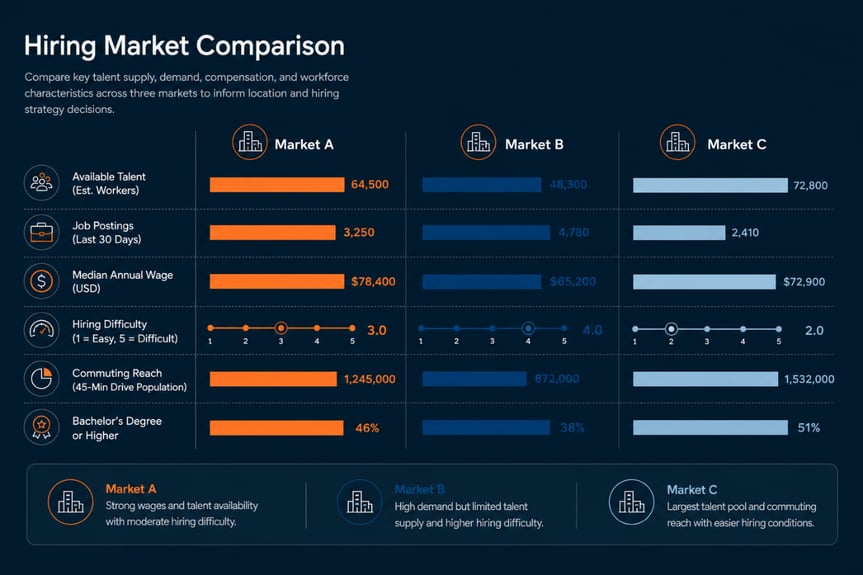
Suppose leadership asks where to place a new service center. Require a hiring market comparison covering worker availability, pay, employer concentration, commuting patterns, and role-specific skills. The output should suit executive review, with clear assumptions.
Use these five questions to set the evaluation scope:
- What decision must be made?
- Which roles, skills, or locations matter?
- What evidence will leaders expect?
- Which report must the tool produce?
- Who will maintain the analysis?
Clear scope also exposes unnecessary features. A regional hiring analysis gains little from an elaborate internal mobility module. The strongest fit completes the required workflow with the least avoidable complexity.
|
Evaluation checkpoint |
What a strong response should show |
|
Business question |
The analysis supports a specific decision. |
|
Evidence |
Each source and its limits are clear. |
|
Final output |
The pilot creates a usable report. |
|
Ownership |
The workflow matches team capacity. |
|
Review standard |
Analysts can explain methods and assumptions. |
|
Ongoing use |
The process supports related requests. |
Data methodology determines the reliability of workforce answers
Methodology determines what the numbers mean, how current they are, and how much confidence your team should place in them. Buyers should ask how sources are combined, how duplicates are handled, how occupations and skills are classified, and how estimates are created when direct observations are limited.
Consider a report that shows 12,000 job postings for a role. That count is useful only when the vendor can explain the period, geography, duplicate controls, occupation mapping, and treatment of staffing firms. Two tools can display the same headline number while measuring different activity.
Transparent methods also help teams explain apparent conflicts. Payroll records, surveys, postings, and profile data describe different parts of the labor market. Each source has a valid use, but none should be presented as a complete measure of talent availability. Chmura addresses this execution need through JobsEQ and direct expert support, giving teams both self-service analysis and help when methods or assumptions require closer review.
Geographic detail must reflect the actual hiring market
Geographic precision matters because workers, employers, wages, and commuting patterns rarely align with a single administrative boundary. A useful tool should support the region that matches the workforce question, including custom areas when counties or metropolitan definitions hide meaningful local differences.
A supplied Chmura region extract illustrates this issue. It separates county, metropolitan statistical area, and micropolitan statistical area records, while distinguishing places with similar names such as Richmond County, Richmond City, and the Richmond metropolitan area. Those three region categories support different forms of analysis.
A hiring team might recruit within a 45-minute commute of a facility that crosses several county lines. A county-only view will understate the reachable talent pool and can distort wage comparisons. Buyers should test drive-time areas, labor sheds, zip codes, and custom regions during the pilot. Geographic flexibility becomes valuable only when the resulting area matches how people actually travel to work.
Internal data requirements shape implementation effort and value
Internal data can add context, but every required connection increases implementation work, governance needs, and maintenance. Teams should separate essential inputs from optional ones before purchase. A product should still answer its main external workforce question when internal records are incomplete.
A workforce planning group might want to combine headcount, role architecture, turnover, and location data with external occupation trends. That can support stronger plans, but only after job titles and locations are standardized. A tool that assumes clean internal data will produce weak results when local naming conventions conflict.
The buying team should document required fields, update frequency, ownership, security review, and error handling. It should also test what happens when a feed fails or a field is missing. Value drops when analysts spend more time repairing inputs than interpreting results. A staged implementation often works best: prove the external use case first, add internal data that materially improves the decision, then retire manual steps only after the workflow is stable.
Workflow fit determines how consistently teams use the software
Workflow fit determines if a useful analysis becomes repeatable work over time. The tool should reduce the time between a question and a stakeholder-ready output without forcing analysts to rebuild the same logic in spreadsheets, presentation software, or separate reporting systems.
Picture a people analytics team that receives a monthly request for hiring risk across 20 priority roles. The tool should preserve role definitions, regional settings, metrics, notes, and export choices. Analysts should refresh the work without recreating charts or checking disconnected sources.
Demonstrations often hide this issue because vendors present a polished result rather than the steps required to produce it. Ask the presenter to start with a fresh request, build the analysis, revise one assumption, and export the final report. Track the number of manual transfers and undocumented choices. The best workforce analytics software fits the team’s actual review process, supports repeatable outputs, and leaves a clear record of how the answer was produced.
Expert support strengthens analysis for important workforce decisions
Expert support matters when a workforce question has unclear definitions, mixed evidence, or large financial consequences. Support should go beyond account administration. Your team needs people who can explain methods, test assumptions, and frame the analysis around the decision leaders must make.
A site selection team comparing two regions might see lower wages in one market and stronger worker availability in another. Software can calculate the measures, but the team still needs to judge occupation fit, commuting reach, data age, and the risks hidden by averages. A knowledgeable analyst can identify where the comparison needs another cut.
Buyers should test support during the pilot rather than relying on service descriptions. Submit a question that requires interpretation, ask for a method explanation, and note the quality and speed of the response. Strong support improves internal capability because users learn how to frame better questions and explain limits. It also reduces the risk that a polished chart receives more confidence than its evidence deserves.
Pilot tests should produce reports stakeholders can use
“A pilot succeeds when it produces a defensible answer and a usable deliverable for a live workforce question.”
Login counts and feature tours provide little proof. The test should show that your team can move from request to analysis to communication within normal time and skill limits.
Choose one decision with a real audience, deadline, and consequence. Require the vendor to use agreed definitions, document the method, revise an assumption, and produce the final report. Then ask an executive, recruiter, compensation leader, or workforce planner to review it without vendor guidance.
The final judgment should focus on clarity, repeatability, and trust. Chmura’s model pairs JobsEQ with direct access to workforce experts, which reflects a practical truth about this category: software handles repeatable analysis, while informed support strengthens work that carries more uncertainty or risk. A disciplined pilot shows if both parts are available when your team needs them. That is the standard that turns a purchase into a dependable workforce process.